


Does My Phone Support eSIM? The Quick Answer
You are about to fly abroad. You want to avoid roaming charges, which are the extra fees your home mobile company adds when you use your phone overseas. A travel eSIM is a simple fix, but only if your phone can use one.
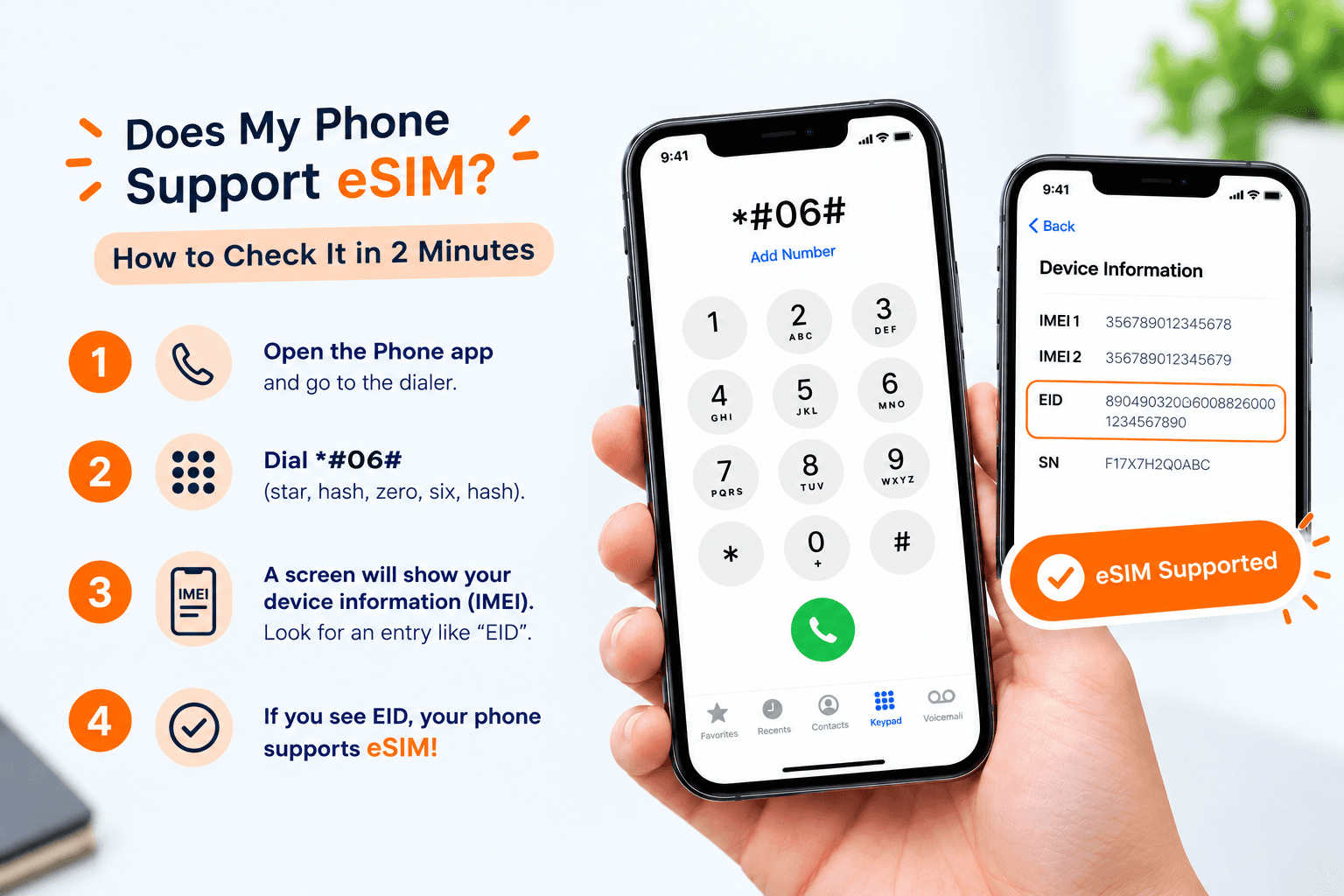
Most phones made since 2018 support eSIM. An eSIM is a SIM built into your phone, so there is no small plastic card to swap. The fastest test: open your phone keypad and dial *#06#. If you see a long number labelled EID, your phone supports eSIM.
Below you will find the exact steps for iPhone and Android. You will also learn about one hidden problem, called a carrier lock, that can stop an eSIM from working even on a supported phone.
Which Phones Work With eSIM?
Every big phone brand now makes eSIM models. The table below is a rough guide. Your exact model is what counts, so still do the checks further down.
| Phone brand | Usually works with eSIM | Good to know |
|---|---|---|
| Apple iPhone | iPhone XS, XS Max and XR (2018), and every iPhone after them, including the SE from 2020 | iPhones sold in the United States from the iPhone 14 onward have no SIM card slot at all |
| Samsung Galaxy | Galaxy S20 and newer S models, Note20, Z Flip and Z Fold | Some versions sold in certain countries have no eSIM, so check your own phone |
| Google Pixel | Pixel 3 and newer | Test yours with the steps below rather than guess |
| Other Android brands | Some Motorola, Xiaomi, OnePlus and Oppo models | Support depends on the model and the country it was sold in |
| Tablets | iPads with a cellular option and some Galaxy Tabs | Wi-Fi-only tablets cannot use an eSIM |
For a longer list, see our eSIM compatible device list.
How to Check on an iPhone
This takes less than a minute. You do not need internet.
- Open the Settings app.
- Tap General.
- Tap About.
- Scroll down the list.
- Look for a line called EID. This is a long number that identifies the eSIM inside your phone.
If you can see an EID, your iPhone supports eSIM. You may also see a line called Digital SIM or Available SIM. That is another good sign.
How to Check on an Android Phone
Menu names change a little between brands. The idea is the same: look for an EID number, or an option to add an eSIM.
On a Samsung Galaxy
- Open Settings.
- Tap About phone.
- Tap Status information.
- Look for an EID line.
On a Google Pixel
- Open Settings.
- Tap About phone.
- Look for the EID line.
Another way on any Android
Open Settings, then Network and internet, then SIMs. If you see Add SIM or a message like Download a SIM instead, your phone can use an eSIM.
The 10-Second Check: Dial *#06#
This trick works on iPhone and on most Android phones. It is the quickest way if you do not want to dig through menus.
- Open the Phone app.
- Tap the keypad.
- Type *#06#. You do not need to press the call button.
- Read the box that appears.
You will see an IMEI, which is your phone's own serial number. If you also see an EID, your phone supports eSIM. If there is only an IMEI, it most likely does not.
Is Your Phone Locked? The Check Most People Miss
A phone can support eSIM and still refuse a travel eSIM. This happens when it has a carrier lock. That means your home mobile company has set the phone to work only on its own network.
Phones bought on a monthly payment plan are often locked until you finish paying. Phones bought outright are usually unlocked.
On an iPhone, go to Settings, General, About, then find the line Carrier Lock. If it says No SIM restrictions, you are fine. On Android, the easiest route is to ask your mobile company whether your phone is unlocked.
If it is locked, ask them to unlock it. Many companies will do this once the phone is paid off. Do it a week or two before you fly, because it can take a few days.
What If My Phone Does Not Support eSIM?
Do not worry. You still have options.
- Buy a local SIM card on arrival. Many big airports have SIM shops or vending machines in the arrivals hall. Expect a queue, and bring your passport, because some countries ask for it.
- Use the free Wi-Fi at your hotel, cafes and airports. This works for messages and maps, but not when you are out and about.
- Compare the cost first. Our guide on whether an eSIM is cheaper than roaming shows how the options stack up.
Your Phone Works With eSIM. What Next?
Good news. You can now sort out your data before you leave home, instead of hunting for a shop after a long flight.
- New to eSIMs? Read what an eSIM is and how it works.
- Ready to set one up? Follow our eSIM installation guide. You need a Wi-Fi connection to do it.
- Still have questions? Our frequently asked questions page covers the basics.
You can keep your normal SIM in your phone. Your eSIM handles internet data, and your home SIM stays ready for calls and texts if you want them.
Check Now, Travel Calmer
Checking takes two minutes: dial *#06#, look for an EID, and confirm your phone is not locked. Do it a few days before your trip, so you have time to fix anything. When you are ready, you can see the eSIM options for your destination on our plans page.


