"This code is no longer valid": how to fix it
Quick answer
This message usually means the eSIM is already installed on your phone. Check your SIM list first. If it is not there, message us on WhatsApp and we will help.
Each eSIM QR code works once. If it was already scanned, even by accident, the phone shows this message.
Step by step
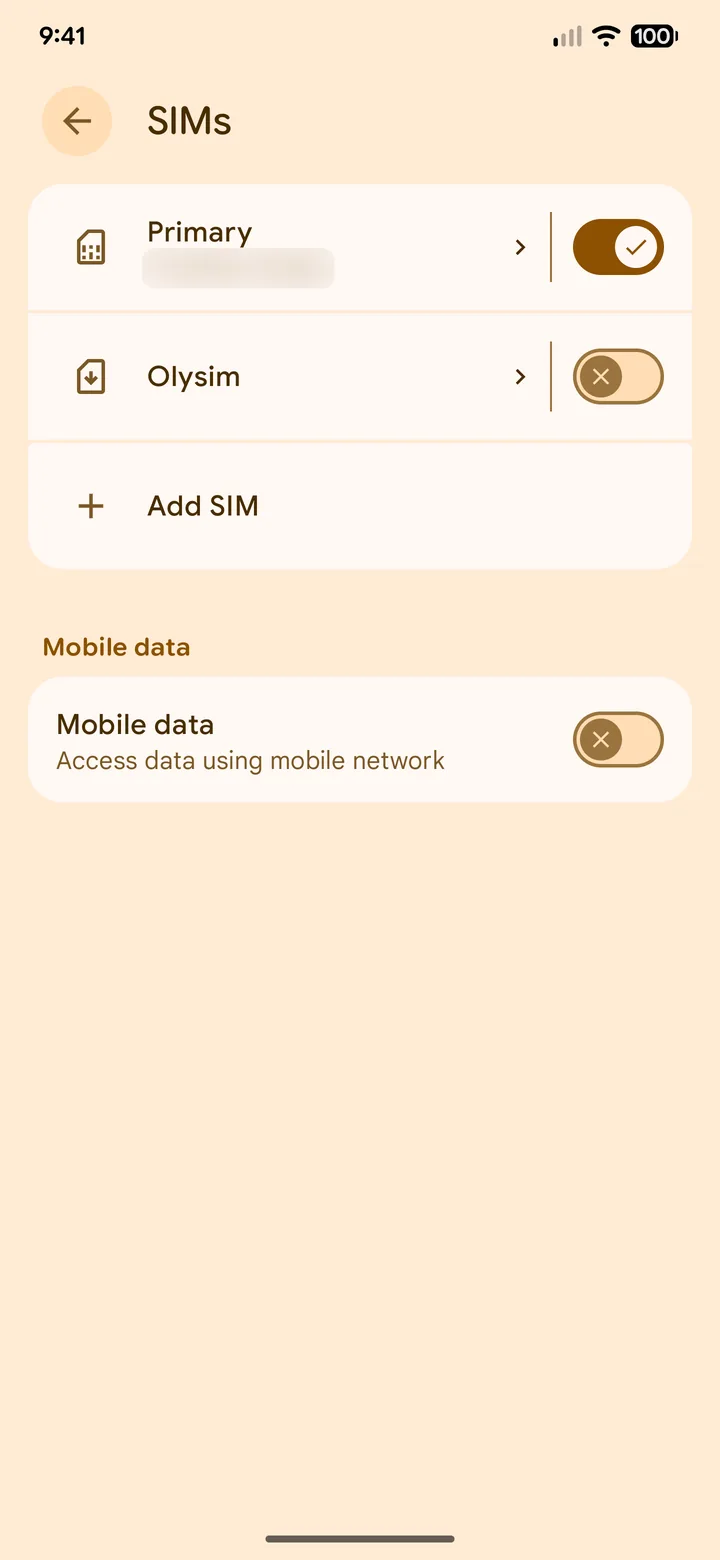 1Step 1 of 4
Open your SIM list and look for the Olysim eSIM.
iPhone: Settings > Mobile Service. Samsung: SIM manager. Pixel: Network & internet > SIMs.
- 2Step 2 of 4
See it there? You are done. It is installed.
Turn it on when you land.
- 3Step 3 of 4
Not there? Check whether you scanned it on another phone.
An eSIM can be installed on one phone only.
- 4Step 4 of 4
Still stuck? Message us on WhatsApp with your order email.
We will check the eSIM and tell you what to do next.
Common questions
Can I use the QR code again?
No. A QR code installs the eSIM once. After that, the code says it is no longer valid.
I deleted the eSIM. Can I scan the code again?
Usually not. Message us straight away and we will check what can be done for your plan.
Did this solve it?